seo - Web Design, SEO

photographer-wordpress-plugins

10 WordPress Plugins Every Photographer Should Be Using

Posted by | Photography, Wordpress | One Comment

WordPress the most popular open source CMS in the market. In fact, it’s so popular that 22% of all the websites in the world are built using it. Part of its attraction is the massive developer community supporting it. Developers create plugins, and plugins extend WordPress, letting you take it in whatever direction suits your needs.

There are some plugins that turbo-charge any WordPress installation, taking it from blogging platform to powerful CMS. They enhance WordPress, making it faster and more powerful. Chances are that your competitors are using these plugins so maybe its time that you thought about using them too. Read More

webmarketingreport

SEO is Still The Best for Generating Leads Online Report Shows

Posted by | Online Marketing, SEO | No Comments

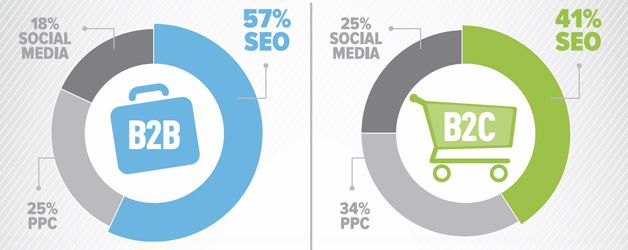
A new survey shows that SEO is the best source of leads for both B2B and B2C marketers, beating out both PPC and social media marketing of online marketers. But more of those surveyed say they plan to increase their social media marketing budgets in 2012, ahead of SEO and PPC.

The results reveal that:

  • 46% of B2B participants said their most important objective is to generate leads.
  • 53% of all participants say SEO makes the biggest impact on lead generation, followed by 28% for PPC and 19% for social media.
  • 75% of B2C companies are the most active on Facebook, followed by 8% on Twitter and 6% on LinkedIn.
  • B2B companies are active more evenly across all three leading networks: 34% Facebook, 26% Twitter, and 25% LinkedIn.

The 2011 Webmarketing123 State of Digital Marketing survey was conducted online in September. Over 500 marketing professionals completed the survey.  You can download the entire report here.

Overall, 60 percent of respondents said they plan to increase their budget for social media marketing in 2012; 53 percent plan to increase their budget for SEO and 40 percent will increase their PPC budget.

Source: Search Engine Land

16 WordPress Plugins for Better SEO

Posted by | SEO, Wordpress | No Comments

WordPress is pretty SEO Friendly out-of-the-box but there are some things that aren’t built in and that’s why SEO plugins are necessary.  This list of wordpress SEO plugins do some cool things that will help you increase how effective your wordpress site is to search engine rankings.  Little things like using correct title tags for your posts make a lot of difference.  These plugins below will further extend wordpress to be even more SEO friendly.  And they should all be compatible with WordPress 3.0+.

Here’s a list of 16 SEO plugins for WordPress.

1. All in one SEO pack

(Visit Site) Automatically optimizes your WordPress blog for Search Engines and gives you many options for customizing things such as Meta data like page titles.

Features

  • Support for Custom Post Types
  • Advanced Canonical URLs
  • Fine tune Page Navigational Links
  • Built-in API so other plugins/themes can access and extend functionality
  • ONLY plugin to provide SEO Integration for WP e-Commerce sites
  • Nonce Security
  • Support for CMS-style WordPress installations
  • Automatically optimizes your titles for search engines
  • Generates META tags automatically
  • Avoids the typical duplicate content found on WordPress blogs
  • For beginners, you don’t even have to look at the options, it works out-of-the-box. Just install.
  • For advanced users, you can fine-tune everything
  • You can override any title and set any META description and any META keywords you want.
  • Backward-Compatibility with many other plugins, like Auto Meta, Ultimate Tag Warrior and others.
[divider_line]

2. WordPress SEO

(Visit Site) WordPress SEO is an all in one solution to search engine optimize your WordPress blog, featuring titles, meta descriptions, optimized breadcrumbs, XML.

Features

  • Post title and meta description meta box to change these on a per post basis.
  • Taxonomy (tag, category & custom taxonomy) title and meta description support.
  • Google search result snippet previews.
  • Focus keyword testing.
  • Meta Robots configuration: o Easily add noodp, noydir meta tags. o Easily noindex, or nofollow pages, taxonomies or entire archives.
  • Improved canonical support, adding canonical to taxonomy archives, single posts and pages and the front page.
  • RSS footer / header configuration.
  • Permalink clean ups, while still allowing for, for instance, Google Custom Search.
  • Breadcrumbs support, with configurable breadcrumbs titles.
  • XML Sitemaps with: o Images o Configurable removal of post types and taxonomies o Pages or posts that have been noindexed will not show in XML sitemap.
  • XML News Sitemaps.
  • .htaccess and robots.txt editor.
  • Basic import functionality for HeadSpace2 and All in One SEO.
[divider_line]

3. ScribeSEO

(Visit Site) ScribeSEO takes all the guesswork out of SEO for your wordpress site.  It basically does the majority of the SEO work for you and helps you:

  • Discover the correct profitable keywords
  • Stay automatically up to speed on SEO best practices
  • Optimize your content better and faster
  • Avoid content that reads like it was written by a robot
  • Build quality links with less hassle and confusion

ScribeSEO is not free.[divider_line]

4. SEO smart links

(Visit Site) SEO Smart Links provides automatic SEO benefits for your site in addition to custom keyword lists, nofollow and much more.

Description

SEO Smart Links provides automatic SEO benefits for your site in addition to custom keyword lists, nofollow and much more. SEO Smart Links can automatically link keywords and phrases in your posts and comments with corresponding posts, pages, categories and tags on your blog. Further SEO Smart links allows you to set up your own keywords and set of matching URLs. Finally SEO Smart links allows you to set nofollow attribute and open links in new window. It is a perfect solution to get your blog posts interlinked or add affiliate links to other sites. Everything happens completely transparent, and you can edit the options from the administration settings panel.
[divider_line]

5. Google XML sitemaps

(Visit Site) This plugin will generate a special XML sitemap which will help search engines to better index your blog.

Description

This plugin will generate a special XML sitemap which will help search engines like Google, Bing, Yahoo and Ask.com to better index your blog. With such a sitemap, it’s much easier for the crawlers to see the complete structure of your site and retrieve it more efficiently. The plugin supports all kinds of WordPress generated pages as well as custom URLs. Additionally it notifies all major search engines every time you create a post about the new content.
[divider_line]

6. Platinum SEO pack

(Visit Site) Platinum SEO Plugin offers Complete onsite SEO solution for your WordPress blog.

Features

  • Automatic 301 redirects for any permalink changes
  • Canonical URLs
  • Optimized Post and Page Titles for search engines
  • Generates all SEO relevant META tags automatically
  • Option to specify meta description and meta keywords tag for categories and tag pages.
  • Option to turn off Page title or Post title rewrites for any particular post or page
  • Option to turn off Page title or Post title format for any particular post or page
  • Helps you avoid duplicate content
  • Lets you override any title and set any META description and META keywords, for any post or page
  • Support for custom taxonomies in version 1.3.4
  • Compatible with most other plugins, like Auto Meta, Ultimate Tag Warrior and others.However you may have to disable All in One SEO pack
  • You don’t have to fear changing permalinks. If you are not satisfied with the current permalink, change it through Settings>Permalinks in your admin panel, without worrying about loss of Page rank or google penalty.Platinum SEO plugin will take care of issuing a 301 redirect to the new location.This is a new essential feature, not present in All in one SEO
  • Add index, noindex, follow or nofollow, noodp, noydir, noarchive, nosnippet meta tags to any post/page.These options are not available in All in one SEO Pack.Find out why this option to set post/page level Meta Robots Tag useful?
[divider_line]

7. SEO friendly images

(Visit Site) SEO Friendly Images is a WordPress optimization plugin which automatically updates all images with proper ALT and TITLE attributes.

[divider_line]

8. Redirection

(Visit Site) Redirection is a WordPress plugin to manage 301 redirections, keep track of 404 errors, and generally tidy up any loose ends your site may have.

[divider_line]

9. SEO No Duplicate

(Visit Site) This plugin helps you manage your search engine duplicate content, by setting your post page’s canonical to the permalink.

[divider_line]

10. Headspace 2

(Visit Site) HeadSpace is a powerful all-in-one plugin to manage meta-data and handle a wide range of SEO tasks.

[divider_line]

11. I Love Social Bookmarking

(Visit Site) I Love Social Bookmarking is a simple WordPress plugin that allows your readers to submit your content to social media services via a clutter-free drop-down list. SEO optimised by using the “nofollow” tag.

[divider_line]

12. Robots meta

(Visit Site) This plugin makes it easy to add the appropriate meta robots tags to your pages, disable unused archives, nofollow unnecessary links and more.

Features

  • Prevent indexing of your search result pages, while still allowing the search engines to follow the links on them, by adding noindex, follow robots meta tags.
  • Disallow indexing of subpages to your homepage, category pages, author pages and tag pages, to prevent duplicate content.
  • Prevent indexing of your login, register and admin pages by adding noindex robots meta tags.
  • Add noodp an noydir meta robots tags, allowing you to opt out of DMOZ and Yahoo! Directory descriptions.
  • Prevent Yahoo! and Google from indexing your feeds by adding a meta tag to their head-section.
  • Prevent indexing of just your comment feeds.
  • Disable author and date-based archives.
  • Prevent attachment pages from ranking in the search results over your articles.
  • Enforce a trailing slash on archives.
  • Edit your .htaccess and your robots.txt from within WordPress.
  • Assign robots meta tags to individual posts & pages.
  • Verify your site with Google Webmaster Tools, Yahoo! Site Explorer and Bing Webmaster Tools.
  • Add noarchive tags to your blog (Thanks to Henryk Gerlach).
[divider_line]

13. WP super cache

(Visit Site) This plugin generates static html files from your dynamic WordPress blog.  After a html file is generated your webserver will serve that file instead of processing the comparatively heavier and more expensive WordPress PHP scripts.  This plugin makes your site faster and faster loading sites rank better in SERPS.

[divider_line]

14. WP-Paginate

(Visit Site) A simple paging navigation plugin for users and search engines. Instead of next and previous page it shows numbers and arrows.  In addition to increasing the user experience for your visitors, it has also been widely reported that pagination increases the SEO of your site by providing more links to your content.

[divider_line]

15. Nofollow Blogroll SEO

(Visit Site) A simple plugin that adds rel=”nofollow” attribute to non-homepage Blogroll Links. Improves SEO while still providing some link love to your favorite sites.

[divider_line]

16. WP SEO Tags

(Visit Site) This Plugin logs incoming queries from searchengines like Bing, Google and Yahoo. The last requests can be displayed via a sidebar widget.

Dominate Google for competitive keywords using internet marketing tactics such as SEO, affiliate marketing and social networking.

Posted by | Affiliate Marketing, Flickr, Myspace, Online Marketing, SEO, Social Networking | 2 Comments

It’s been a slow year so far on this blog and I appologize.  I’ve been busy, been sick  and have had a hard time getting out of the holiday/winter lulls. I know it’s February now but January seemed to just drag on and on.  Anyway, since it’s been slow I thought I’d recycle some content that I wrote recently.  It is basically a proposal, or part of it anyway for a company who came to me wanting to enter the US market for their back pain product.  I ended up writing up this great 10+ page proposal all for nothing because well they didn’t choose me.  Since there is some useful info in it I thought I’d share it with you instead of letting it go to waste.  It is by no means a comprehensive how-to guide.

It explains keyword research a bit and what is needed to dominate Google for competitive keywords.  So here it is…

Read More

3 Ways Photographers Can Boost Business in A Bad Economy

Posted by | Photography, SEO, Social Networking | 7 Comments

The world is facing economic hardships. The economy however hasn’t come to a complete halt though. People are still looking for photographers and photographers are trying even harder to increase business now that times are a little bit tougher.

(The things I list in this post aren’t solely for photographers btw, they’re for anyone who has a business.)

This is the time when strong businesses thrive and the weak fail. This is the time when it’s essential to hone your marketing skills to bring in new business.

If you’re a photographer and you want to boost your business in these trying times then there are things you can do when you’re not shooting to increase your revenues. I’m going to focus on the web because it’s the cheapest method of marketing and the easiest way to bring in new clients.

To a lot of people search engines are their main means of bringing in new sales (it is for me). That is because they rank on Google, Yahoo or even MSN for keywords people are using to find what they offer. If you’re the first business people find when they go online to look for information or services this means increased sales. That is why SEO has gotten so popular over the years.

If you build your site in accordance to SEO guidelines then you’ll be on your way to the top of the search engines. There are many rules to SEO but if you follow just a few you’ll be doing better than 90% of other photographers in your market. So the first of the 3 ways is making sure your site is as SEO optimized as possible.

Pay Attention to SEO

  1. Make sure your site is SEO friendly. If you’re using a service where your site is easy to update and contains flash then most likely your site is not SEO friendly. If you’re paying a monthly fee to host and maintain your photography site then there is a good chance your site is really being hurt by this. When you skimp on your site you pay in the long run.
  2. Make sure you blog every day. If you don’t currently blog then you’re missing out period. The more you blog the more Google and other search engines will spider your site and this will increase your traffic and rankings. And when you blog from a blog that is SEO optimized you can really see the difference.
  3. Make sure you do at least some basic keyword research to figure out what people are actually searching for. There are free tools online that you can use to find this info out. Search Google for the word Keywords and you’ll find the most popular one. Type in your location and photographer and see how many numbers come up.
  4. Make sure you use H tags in your web pages. H tags are basic heading tags in HTML that specify a title and specify to search engines what a page is about. So if the topic of your page is Photography Services be sure to include that title in between H tags, specifically H1 tags. There are many basic HTML guides out there you can learn how to do this from.
  5. Make sure you use very specific title tags for your pages. Title tags specify what shows up in the browsers title. You know the very top of the browser. Search engines take the title tag very seriously and you should too. The more focused the better.
  6. Make sure you network with other photographers. If you have friends who are photographers then exchange links with them. The more links you have to your site from related sites then the better your site will rank. Be sure your link partners use the main keyword you’re optimizing for in the link text they use to link to you.
  7. Make sure you do not use a splash page on your site. A splash page is usually a flash animation that is an intro to the main part of your site. It usually contains flash and sometimes music. Splash pages are outdated and should never be used on a site. And I mean never if you ever want to rank well on any search engine.
  8. Make sure your site isn’t solely in flash. If it is you’re sacrificing rankings. You need real textual content on your site search engines can read. If you can’t get away from flash make sure you include pages on your site that are linked to from the footer or non flash section that include keywords you want to rank for.
  9. Make sure you’re getting new incoming links each month. Incoming links are links from other related websites. You can get new links to your site by writing and distributing articles like this one, distributing press releases, writing killer blog posts that people willingly want to link to or exchanging links. There are many ways to get links and that is just a few ideas.

Being Found via Local Search

Google Local

Are you on Google Local?

The second method has to do with local search. You can rank on Google very quickly by listing your site as a business in your local area. All you have to do is search Google for “Google Local Business” and the first listing that shows up is Google’s where you can add your business.

What this does is allow you to list your business details including your URL to Google Local and also Google Maps. People searching for your service or business can then find you more easily in their location. Local business listings show up before organic listings in most cases. This depends on what keywords people are using to search of course, but being listed in Google Local is an easy way to get a front page listing in a matter of days.

Another way to get attention is giving away coupons. Google printable coupons are a free and easy way to bring in more business. You decide what your coupons should say, then customers print them out and bring them to your store.

Social Networking is a Must

The third method is social networking. Networking is crucial to any business and has become a lot easier due to the many social networks online now. If you’re a true marketer you can’t ignore the fact that Myspace, Facebook, Linkedin and even Youtube have millions of users who are all interested in certain things, have certain connections and all have needs.

If you’re not taking advantage of social networking right now then you are missing out on a huge audience. Youtube alone has already surpassed Yahoo as the second largest searched site on the web. That means more people search Youtube then they do Yahoo.

People might be on Youtube for different reasons but you can take advantage of this by educating, entertaining or even showing off your work. You already have digital media in the form of photographs. Put those photos into a slideshow video and upload it to Youtube, Googe Video, Yahoo Video, Vimeo, Revver, Viddler, Metacafe or even AOL.   To simplify things you can upload to multiple sites in one fell swoop using a service called Tubemogul.

Don’t forget to brand your videos with a URL back to your site. You can use free video editing software from Microsoft called Movie Maker, Videospin from Pinnacle or even Jumpcut. Brand your videos with your logo, URL and even by giving a quick presentation at the end which includes yourself talking. People love to see other people talking. They should be seeing you next! If you haven’t capitalized on social networking yet then shame on you. The world is out there waiting for you.

If you want to take all your marketing efforts to a new level then give something of value away for free. Give away a PDF ebook on how to take the best photographs, how to save money on their next photo shoot or how to make their photos last a lifetime. If you can put together an informing ebook on a topic people will enjoy and value you’ve just gone a step further than the majority of photographers out there. And this will set you apart big time.

The economy is bad. Everyone knows it. But it’s not the end. If you have some free time right now be sure you are making every effort to market yourself. Marketing online is the cheapest and easiest method available. And don’t forget the offline world where the majority of people reside. That’s very important too.  I’ll talk more about marketing offline in a future post.  Good luck!

Best WordPress SEO Theme

Posted by | SEO, Wordpress | 38 Comments

Are you looking for the best wordpress theme for SEO out of the box?  Since you’re looking for a (SEO) search engine optimized wordpress theme I’d thought I’d give a rave review of what I think is not only the best wordpress theme ever designed, but one that is SEO friendly and highly customizable.

I’m talking about the Thesis theme developed by Chris Pearson of Pearsonified.

Not only is Thesis well developed it is very robust giving bloggers many options for customization.  And yeah, it’s the best wordpress theme I’ve seen where someone took the time to work in things that are important to SEO.  And I’m talking mostly about page structure here… mainly the use of H tags.

H Tags and SEO

If you’re like me you’ve spent hundreds of dollars on wordpress themes over the years only to have to go into the code to fix the H tag structure used.  Which is a pain when you have to upgrade wordpress and the theme frequently.  I can’t count how many wordpress themes I’ve come across where the H tag structure is totally screwed up.  Meaning, H1, H2, H3 and even H4 tags are used for things like the titles in the sidebar.

Thesis Theme for WordPress:  Options Galore and a Helpful Support CommunityH tags are really important to SEO, so each page of your site should only have one H1 tag, and subsequent H tags directly in your post content.  You shouldn’t have H2 and H3 tags wrapped around things that aren’t related to your post… ie.  Blogroll, Recent Posts, Pages, Calendar, etc.

If you want to see what I’m talking about you need to be using the Web Developer toolbar to disable the CSS of your site… or try it on this one to see what I’m talking about.  The post title should be an H1 tag and any subheadings in H2… and H3.

Thesis takes care of this for you and does a perfect job at it.  Right out of the box Thesis includes only a single H1 tag on each page, including the homepage.  Post titles on your homepage are in H2 which is correct.  On sub pages the Post title is H1… not the title of your blog (if you’re using text instead of a graphic) and any subheadings you use in your post are the only ones that appear on the page.  Perfect!

Title Tags in Thesis

Again Thesis gives you some options on the way to display Title tags in your pages.  Which is very helpful.  In your wordpress dashboard navigate to Design > Thesis Options to set the following options.

Change How Page Titles Display Easily

Home page settings:
Show site name in title
Show site tagline in title
Show tagline before title

All other pages:
Append site name to page titles

Because I’m super picky about my title tags here (for obvious SEO reasons) I’ve decided to add my own custom bit of code to display page titles.  If you look at the titles of my pages you’ll notice they’re only the post title or page title, nothing else.  That’s because I want my titles to be super targeted.  Including “Jeff Hendrickson Design” to the ends of my page titles only waters down the keyphrases I’m targeting.  So I leave it out.

Here’s the code I use to achieve this: (NOTE: You no longer have to use custom code to achieve this… it’s built into the admin of Thesis now.. Sweet!)

<title><?php if (is_home () ) { bloginfo(‘name’); } elseif ( is_category() ) {
single_cat_title(); echo ” – “; bloginfo(‘name’);
} elseif (is_single() || is_page() ) {
single_post_title();
} elseif (is_search() ) {
bloginfo(‘name’); echo ” search results: “; echo wp_specialchars($s);
} else { wp_title(”,true); }
?></title>

Add Custom Meta Description Tags

Thesis allows you to easily add and edit Meta Description tags within each post or page by simply adding your description to a custom field.  All you have to do is add a custom field called “meta” to your post or page and insert your desired text.  This means you don’t need any extra SEO plugins to achieve custom Meta descriptions for your blog.

Also to make your category page titles more SEO friendly and unique you can change the titles of your category pages by simply adding a custom field “meta” to your categories.  This gives your category pages a more SEO friendly title then they would have otherwise.

Add Custom Meta Descriptions Easily

Page Content Structure

The page’s content structure is very nice indeed in Thesis.  Your post title (H1 tag) and post content are high up on the page meaning your content is closer to the top of the page in the source code.  This means your page’s main content is the first thing Google or any search engine sees.  They don’t have to wade through countless links and basically all the stuff in your sidebars because your sidebar content appears after your main content in the source code.  You should see this if you view my site using the Web Developer toolbar and disable CSS.

Conclusion

If you’re a blogger using wordpress and you care about traffic and search engine rankings I suggest you pick up Thesis and try it out for yourself.  I only touched on the SEO aspects of Thesis but there are a ton of other great features that make it the theme I will be using here and on clients sites for some time to come.  It comes with lifetime updates as well and I’ve already seen some really sweet new features being added in the last update.  I am looking forward to what comes next.  My hats off to Chris and the team that developed and are continuing development of Thesis.  I appreciate it.

If you’re in the market for the best ever SEO wordpress theme then go get a copy of Thesis.  It’s currently $87 for a single license.   A drop in the bucket if you’re monetizing your site through search engine optimization efforts.

Thesis Updates

Thesis 1.6 has just been released.  It comes packed with a lot of new features that I think are pretty cool and much needed.  Check out this video on some of the new features. This video is on setting up drop down navigation…

As you can see Chris added new features that allow you to edit and customize your navigation menu easily from within the wordpress admin.  Pretty powerful.

In the below video Chris goes more in depth on setting up a site and doing customizations.

I’ve been using Thesis for well over a year on this site and can say without a doubt that it’s the best SEO theme ever produced and probably the best supported and most updated theme out there.  Even when I’m tempted to change the theme just for something different I don’t because I don’t want to have to go through all the customization and upgrade headaches other themes make you go through.  With Thesis it’s a lot more simple.

Grab a copy of Thesis and see for yourself.

FREE Top Ranking On Google – Are You Local?

Posted by | Online Marketing, SEO | 3 Comments

So Google Local and Google Maps have been around for awhile but there are still business owners who aren’t taking advantage of the power these tools bring.  Basically Google Local allows businesses to receive a free business listing under keywords people would use to search for local businesses.  So if you have a business and you’re not taking advantage of Google Local to list your business for free and receive a top ranking on Google then you’re plain missing the boat.

Here’s an example below of Google Local in action.  A simple search for Durham Pet Sitter returns a bunch of local businesses that offer this service.   I’m not sure how the businesses are ranked here… if its first come first serve or if there is some other algorithm that Google is using, but I’d say get on board before it’s too late and you’re listed under the “more results near…” link

Google Local in action

What Google Local is offering for Free to business owners.

Reach new customers on Google Maps and Google.com
Local customers are already searching for the products and services you offer. Why not make it easy for them to find you on Google search and on Google Maps? The Local Business Center is the place to start.

Works great for businesses of any size
Whether you run a single dentist’s office or dozens of coffee shops, manage all your listings from a single account.

Update your listing at any time
Use the Local Business Center to edit your listing whenever and however you like. Your Google Maps results will be updated in a few weeks, not next year.

Catch their eye with printable coupons
Google printable coupons are a free and easy way to bring in more business. You decide what your coupons should say, then customers print them out and bring them to your store.

Google Local gives businesses the ability to receive top rankings in Google without the cost of using Adwords or implementing an SEO campaign.

Sign up for Google Local Free.

How to update the Sitelinks in your Google listing

Posted by | SEO | No Comments

Did you know you can update your sitelinks that Google displays when someone searches for your brand or domain name?  Sitelinks are the extra links that appear under a main listing in search results to help searchers navigate a site without having to first go to the homepage.  They look like this:

Google Sitelinks

You can edit these by using Google’s Webmaster Tools under > Links > Sitelinks

There you can either block or update the current sitelinks Google has listed for your site.  There might be links listed there that you have never seen under your listing in search results.  That’s most likely because your website isn’t popular enough to need it.  And Sitelinks really only show up if someone is searching directly for your brand or domain name (that I’ve seen).  If you don’t own a popular website then this doesn’t really apply to you.  In anycase you can get a sense of what Google sees as your most important pages.

There’s more clarification about Sitelinks here, but I’ve posted the gist of it below written by a Google employee named Maile.

Sitelinks are created algorithmically to help users quickly navigate
to the information they need on your site. To display sitelinks,
Google must basically determine: 1) a relevant structure for your site
conducive to sitelinks, and 2) that sitelinks will be helpful for the
user’s query.

For your verified site in Webmaster Tools, you can view your available
sitelinks. If you choose to block a sitelink, it will then appear in
Webmaster Tools as blocked. Once the change becomes effective, the
blocked sitelink will not appear in search results. You will not
immediately see a new sitelink listed in Webmaster Tools to replace
your blocked sitelink.

For example, let’s say you have 8 sitelinks in Webmaster Tools. If you
choose to block a sitelink, it will be removed from your “Current
sitelinks” section and added to the “Blocked sitelinks” section. The
blocked sitelink will not appear in search results for 90 days, and it
can be unblocked at any time. (It does, however, take a bit of time
for the blocked/unblocked change to take effect.) Every time you visit
the Sitelinks page in Webmaster Tools, whether or not you modify your
Sitelinks settings, the blocked sitelinks will renew their blocked
time for an additional 90 days.

In search results, the sitelinks displayed are determined
algorithmically based on the user’s query. So, while Webmaster Tools
may show 8 sitelinks for your verified site, it’s possible that search
results show only a subset (e.g. search results display 4 sitelinks).
Furthermore, the sitelinks displayed in search results can vary
according to the query (e.g. different combinations of sitelinks for
different queries).

Common questions
Can I trigger new sitelinks to appear in Webmaster Tools?
New sitelinks appear in Webmaster Tools when a general sitelink update
occurs. Updates (i.e. new sitelinks in search results and/or Webmaster
Tools) are not affected by your blocking or unblocking sitelinks. New
sitelinks cannot be triggered manually.

How can I get sitelinks to appear for my site in search results?
Your site must have at least 3 unblocked sitelinks in order for your
sitelinks to appear in search results.  Therefore:

1. If you block sitelinks in Webmaster Tools and leave fewer than 3
remaining, no sitelinks will appear for your site in search results.

2. If you have fewer than 3 sitelinks algorithmically generated for
your site, you will not see a sitelink options in Webmaster Tools.

Sitelinks are calculated algorithmically. Having a crawlable,
intuitive architecture is helpful in generating sitelinks. Also,
creating compelling, unique content or providing a useful service
(thus making your site highly relevant to user queries) can increase
the probability of sitelink generation — and thus your site
displaying sitelinks in search results!

Major SEO change at Google… They’re OK with dynamic URLs… kinda

Posted by | SEO | 2 Comments

So I found out about this over at SE Roundtable where the headline caught my attention.  It seems a little misleading “Major Google SEO Change: Google Prefers You Don’t Use URL Rewrites”

You should still use URL Rewrites if you’re either dealing with a smaller site like say a blog or an ecommerce site where it makes more sense to use a descriptive URL then one that contains a bunch of parameters humans can’t read.  I’ve highlighted in red the main point you should keep in mind.  I also think having your keywords in the pages URL helps in your rankings.

Here’s what Google had to say…

Which can Googlebot read better, static or dynamic URLs?
We’ve come across many webmasters who, like our friend, believed that static or static-looking URLs were an advantage for indexing and ranking their sites. This is based on the presumption that search engines have issues with crawling and analyzing URLs that include session IDs or source trackers. However, as a matter of fact, we at Google have made some progress in both areas. While static URLs might have a slight advantage in terms of clickthrough rates because users can easily read the urls, the decision to use database-driven websites does not imply a significant disadvantage in terms of indexing and ranking. Providing search engines with dynamic URLs should be favored over hiding parameters to make them look static.

Myth: “Dynamic URLs cannot be crawled.”
Fact: We can crawl dynamic URLs and interpret the different parameters. We might have problems crawling and ranking your dynamic URLs if you try to make your urls look static and in the process hide parameters which offer the Googlebot valuable information. One recommendation is to avoid reformatting a dynamic URL to make it look static. It’s always advisable to use static content with static URLs as much as possible, but in cases where you decide to use dynamic content, you should give us the possibility to analyze your URL structure and not remove information by hiding parameters and making them look static.

Myth: “Dynamic URLs are okay if you use fewer than three parameters.”
Fact: There is no limit on the number of parameters, but a good rule of thumb would be to keep your URLs short (this applies to all URLs, whether static or dynamic). You may be able to remove some parameters which aren’t essential for Googlebot and offer your users a nice looking dynamic URL. If you are not able to figure out which parameters to remove, we’d advise you to serve us all the parameters in your dynamic URL and our system will figure out which ones do not matter. Hiding your parameters keeps us from analyzing your URLs properly and we won’t be able to recognize the parameters as such, which could cause a loss of valuable information.

Following are some questions we thought you might have at this point.

Does that mean I should avoid rewriting dynamic URLs at all?
That’s our recommendation, unless your rewrites are limited to removing unnecessary parameters, or you are very diligent in removing all parameters that could cause problems. If you transform your dynamic URL to make it look static you should be aware that we might not be able to interpret the information correctly in all cases. If you want to serve a static equivalent of your site, you might want to consider transforming the underlying content by serving a replacement which is truly static. One example would be to generate files for all the paths and make them accessible somewhere on your site. However, if you’re using URL rewriting (rather than making a copy of the content) to produce static-looking URLs from a dynamic site, you could be doing harm rather than good. Feel free to serve us your standard dynamic URL and we will automatically find the parameters which are unnecessary.

Should you try to make your dynamic URLs look static?
Following are some key points you should keep in mind while dealing with dynamic URLs:

  1. It’s quite hard to correctly create and maintain rewrites that change dynamic URLs to static-looking URLs.
  2. It’s much safer to serve us the original dynamic URL and let us handle the problem of detecting and avoiding problematic parameters.
  3. If you want to rewrite your URL, please remove unnecessary parameters while maintaining a dynamic-looking URL.
  • If you want to serve a static URL instead of a dynamic URL you should create a static equivalent of your content.
  • So what’s the point of all this?

    Unless you have a site producing large dynamic URL’s you have nothing to worry about.  Don’t go turning off Permalinks in wordpress or stop using Mod-rewrite because Google can now index dynamic URL’s a bit better.

    Btw, here’s the link to the full article over at the Google Webmaster blog

    How I Got Over 200,000 Backlinks For Under $300?

    Posted by | General | No Comments

    Is it possible to get over 200,000 backlinks for under $300? Or what about generating $8,000 in revenue from a $275 total investment? Or how about building a website with over 68,000 pages for $275?

    Well I’m here to say that it is totally possible because I did just that. And I’m revealing how I did it in my new special report.

    Inside you’ll learn:

    How I Built A Site With 68,000+ Pages In Just A Few Days

    How I Got 23,560 FREE Backlinks To The Site In Just 14 Months (That’s Over 1,600+ New Backlinks Every Month)

    How I Got The Site To Go From A PR0 to A PR5 In Just 14 Months

    How I Made $8,000.00 In Profit From It.

    All For Under $275 – Total Investment.

    That’s A 2,809% (ROI) Return On Investment.

    But Get This,

    One year later the web site now has over 210,000+ backlinks (That means the site has received over 7,000 backlinks every single month for the last 30 months.)

    And the site now has an estimated value of $175,000.00+ according to DNScoop.com.

    Learn Exactly What Site And How I Built It Inside This 29 Page Special Report.

    This report is for Newbies and Advanced Internet Marketers alike, especially for those on a tight budget.

    It is included as a bonus to my Web Directory Profits information product you can buy for $37.

    This special report is instantly downloadable and is delivered in PDF format.

    This report is not about blackhat SEO and does not contain any blackhat tactics.  It’s all legitimate and shows you how to do the same.

    Visit Web Directory Profits for more info.

    82 Premium WordPress Themes for $39 from ElegantThemes Learn more