flash - Web Design, SEO

Simple Flash Gallery

Simple Flash Image Gallery

Posted by | Photography, Wordpress | One Comment
Get the flash player here: http://www.adobe.com/flashplayer

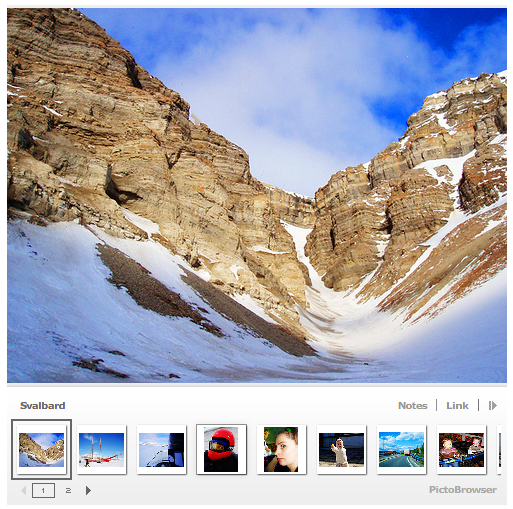
This is probably the easiest method for displaying an image gallery on your site or blog.  It takes about a minute or two to set up.  Now you can display your flickr photos in style.  To build your own go here to the PictoBrowser builder page.

Update: After 4 years (I posted this originally on Dec 8th 2008) this service still works. You do need to have some groups or sets of photos made public. You probably need to log into your flickr account and update some settings if it’s not working. But I just tested it as of Dec. 24. 2012 and it still works. Cool! Too bad Flash doesn’t work on iDevices.

Commission Junction Now Offering Flash Banner Ads

Posted by | Affiliate Marketing | No Comments

Flash Hosting provides Commission Junction’s advertisers and publishers with a new type of link creative… Flash banner ads.

Feature short, non-interactive animated banner ads.

They automatically start, have continuous play and generally last approximately 5-15 seconds.

Use advertiser created Flash (.swf) files, which are created using Adobe Flash software or with other programs capable of writing .swf files.

Commission Junction hosts and tracks these links just like other link types. You can obtain link code for Flash links the same way you do for all other link types via the CJ Account ManagerTM.

What are the key benefits of Flash Hosting for publishers?

Flash Hosting simplifies the process of an advertiser creating and offering Flash links via the CJ Account Manager, meaning that more advertisers may be inclined to start offering Flash links. In addition, industry research points to rich media, such as Flash, driving higher conversion rates than their standard .GIF/.JPEG counterparts.

Who can use Flash links?

All publishers can utilize Flash links once their joined advertisers offer them.

What do clients need to do to begin using Flash Links?

Once an advertiser begins offering the Flash ads, you can immediately begin to obtain the Flash link code as you would for any other link type. Please note that you can only obtain HTML code for Flash links (no JavaScript).

When will Flash Ads be available?

Flash Ads will be available starting August 29, 2008.

Flash and SEO – Google Improves Flash Indexing

Posted by | SEO | 2 Comments

Google has improved it’s ability to spider and index Adobe Flash SWF files. It can index textual content as well as external links embedded in a Flash site.

Although I believe they’ve had the ability to spider flash files for awhile they have officially come out and announced it and also described more about what in Flash files they do index.

Q: What content can Google better index from these Flash files?

All of the text that users can see as they interact with your Flash file. If your website contains Flash, the textual content in your Flash files can be used when Google generates a snippet for your website. Also, the words that appear in your Flash files can be used to match query terms in Google searches.

In addition to finding and indexing the textual content in Flash files, we’re also discovering URLs that appear in Flash files, and feeding them into our crawling pipeline—just like we do with URLs that appear in non-Flash webpages. For example, if your Flash application contains links to pages inside your website, Google may now be better able to discover and crawl more of your website.

Q: What about non-textual content, such as images?

At present, we are only discovering and indexing textual content in Flash files. If your Flash files only include images, we will not recognize or index any text that may appear in those images. Similarly, we do not generate any anchor text for Flash buttons which target some URL, but which have no associated text.

Also note that we do not index FLV files, such as the videos that play on YouTube, because these files contain no text elements.

Q: What do I need to do to get Google to index the text in my Flash files?

Basically, you don’t need to do anything. The improvements that we have made do not require any special action on the part of web designers or webmasters. If you have Flash content on your website, we will automatically begin to index it, up to the limits of our current technical ability (see next question).

That said, you should be aware that Google is now able to see the text that appears to visitors of your website. If you prefer Google to ignore your less informative content, such as a “copyright” or “loading” message, consider replacing the text within an image, which will make it effectively invisible to us.

So if you want to hide any text from Google just replace it with an image and it will be invisible to them?

Anyway, I think Google improving it’s ability to index Flash based sites is good news for people with Flash based sites that don’t know any better or care about their rankings because I still see using Flash in it’s entirety for a website as a bad decision SEO wise – Also see “Case Against Flash“. It’s still better to use standard CSS/XHTML or plain HTML pages if you want to rank high for your industries keywords.

Also does anyone else see black hat SEO’s taking advantage of this? You can embed the entire encyclopedia in a small flash file that Google could essentially index if you wanted to. Or what about embedded links? I can definitely see this being abused. What do you think?

Advanced Flash Slideshow

Posted by | Photos | 5 Comments

Have you seen my flash photo slideshow yet? I just upgraded it to the new Slideshowpro 1.60. I’m also using SSP Director which is a super sweet admin for it. It allows you to create albums and galleries and edit every aspect of your slideshow online. No messing with creating XML files by hand!

Slideshowpro is now even more advanced fully supporting video! What a godsend. Any professional photographer who wants to display photographs on their website should be using this script in my opinion. It is by far the best flash photo gallery slideshow you can get right now.

Yes you can embed your favorite audio track in the slideshow, but don’t! No one likes having to listen to someone else’s favorite music. Not everyone has the same tastes. Also it’s annoying if you’re already listening to music on your computer. Let your photos speak for themselves!

Free Flash Photo Gallery Script

Posted by | General, Photos | 39 Comments

I stumbled upon this cool little flash photo gallery script that allows you to run a cool flash slideshow on your site. It is super easy to install and use. It’s basically a few files you have to upload and change the permissions to.  (that’s not what you’re looking for I’d definitely try ActiveDen.  There are currently over 20 different flash xml scripts you can use as templates or galleries.  And most are pretty cheap.)

Then upload your images and it will create the thumbnails for you. You do need GD library installed on your server for the image resizing feature so make sure you have that installed first.Photos of Norway I installed it on my Photos of Norway site in just a few minutes. There is also a cool flickr script which you can also use to create a cool flash gallery from your flickr photos.

The simpleviewer script is great for showing off your photos and is perfect if you are a photographer and need to easily display your photos on your website. Because it is flash though it’s not the best for search engine optimization purposes. I would suggest putting your photo gallery either in a subdirectory or if you do add it to your homepage that you do it in a way that leaves some space for static content.

I added a table to the top of my photos of norway site that includes static links to other sections of the site that the search engines can see and I could of added more text content to the lower section of the page if I wanted but left it out since I am not running an seo campaign for my photos of norway site. But if you are concerned with using flash for your photography site then there are ways to do it where you can still create an seo optimized page mixing flash with static content.

If you are looking for a more advanced flash photo gallery script be sure to check out my photo slideshow page where I display a very nice looking flash gallery that can be embedded into any site.

If you want more information or need help installing this or any script on your website please contact me. I’m a professional web designer that can help you with your business website.

If you’d like to take a look at a cool non flash website for your photography website then check out that link. You don’t need flash for a spiffy looking site.

If you need any help designing or optimizing your website please contact me.

Also, you might be interested in this super simple flash gallery that pulls images from your flickr account.  You can use it on your blog or normal html site.  It is also Free.

Some other posts about photography:

3 Ways Photographers Can Boost Business In A Bad Economy

WordPress Themes for Photographers

Embed Slideshow Pro in WordPress

Advanced Flash Slideshow – the best one on the market in my opinion.

Interested in creating more exciting slide shows of your photographs? Check out Animoto

XML Gallery Interested in creating flash slideshows or entire flash based websites with your photos? Check out Activeden

82 Premium WordPress Themes for $39 from ElegantThemes Learn more